


Billing is where most ABA practices quietly bleed revenue. Mastering billing and insurance claims with Theralytics Software closes that gap by automating the steps that generate the most errors. Every manual touchpoint is a liability. This guide covers the full workflow, charge capture through payment posting, with the specific tools and configuration steps you need to run a clean revenue cycle.
Why ABA Practices Struggle With Billing and Claims
ABA billing isn't like general medical billing. A single client receiving 25 hours per week of therapy generates more than 5,000 billable units per year, every one of them tied to time-based CPT codes, payer-specific modifiers, and active prior authorizations. Manual processes at any point in that chain create compounding errors.
The cost pressures facing ABA agencies make this worse. Reimbursement rates are falling in multiple states while claim problems keep climbing simultaneously. That's a brutal combination. Practices that haven't built clean billing infrastructure pay for it directly in denials.
The Cost of Manual Billing Processes
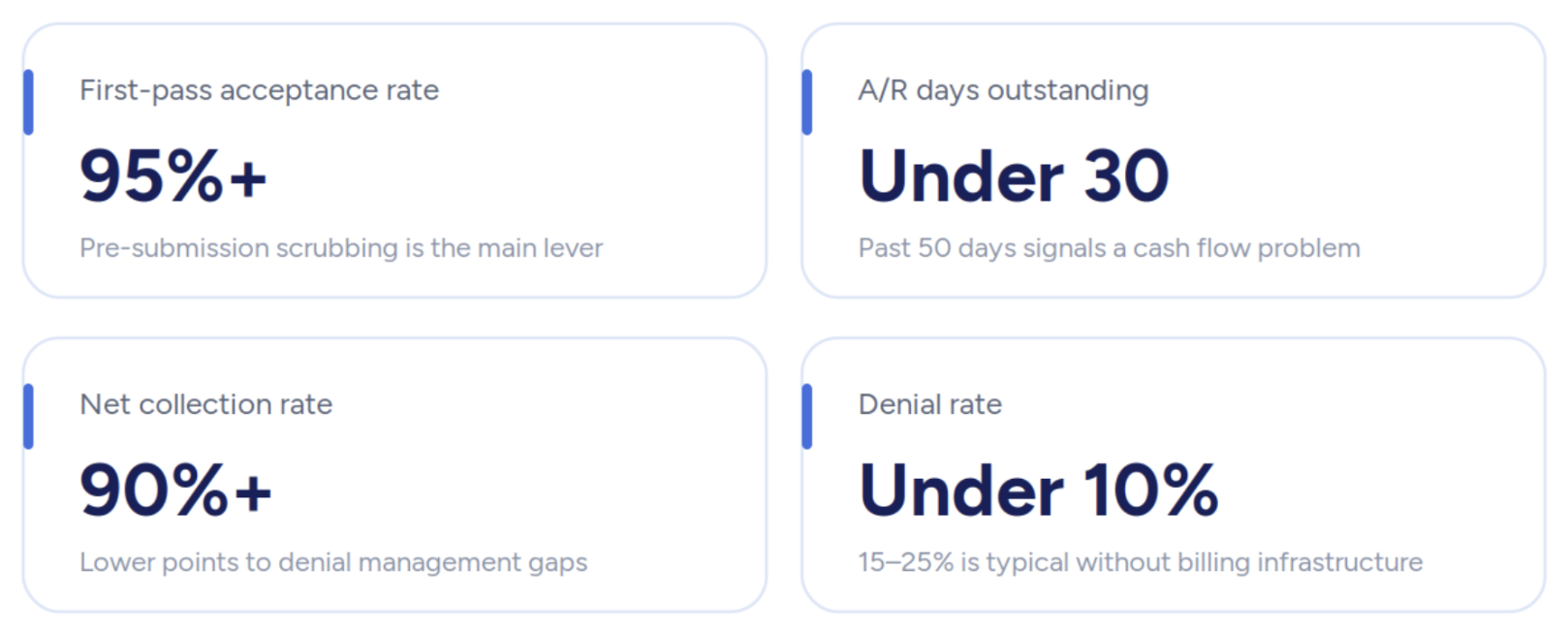
Manual charge entry means transcription errors, missed modifiers, and codes attached to the wrong provider credential. Every single one of those errors is a potential denial. According to research on ABA revenue cycle challenges, practices without dedicated billing infrastructure see denial rates of 15 to 25%, compared to a 5 to 10% healthcare average, a gap that's almost entirely preventable. Fix the infrastructure. Close the gap.
Before outsourcing ABA billing, or deciding to manage it in-house, you need a platform that eliminates the manual steps generating those errors in the first place. Theralytics addresses this directly in its outsourcing guidance, emphasizing that in an era of increasing data breaches, a billing partner must care about securing your data as much as you do, which is why vetting a partner's security standards is as important as evaluating their claim submission workflows.
Common Insurance Claims Rejections and Delays
The most frequent ABA denial triggers are authorization-related. Services billed outside the approved date range, units exceeding authorized quantities, and credentialing mismatches in box 24J cause enormous damage quietly and consistently. Incorrect modifier pairing (HM, HO, HN), duplicate submissions, and missing EPSDT referral codes for Medicaid programs round out the list. Each one has a direct fix inside Theralytics.
How Theralytics Automates Your Entire Billing Workflow
Theralytics moves claims through the revenue cycle without manual re-entry. Session data captured during scheduling flows straight into the billing queue. CPT codes and modifiers are applied at the point of charge entry, and the claim reaches the clearinghouse already validated. The platform's integrated practice management approach means scheduling, documentation, and billing all share the same data layer, no silos, no reconciliation headaches.
The ABA billing service runs on a performance-based model: you pay 4.5% of receivables once collected, which ties Theralytics' incentives directly to your collection rate.
Built-In Compliance Checks That Catch Errors Before Submission
Before any claim leaves the system, Theralytics runs validation logic against payer rules, modifier requirements, and authorization records. Providers who want a closer look at the efficiency gains from automated workflows can find those in the platform documentation. Here's the catch. These checks only work if payer configuration is accurate, which makes setup the single most important step you'll take, and setting up client insurance and payer configuration correctly from the start is what determines whether that validation logic executes as intended.
Real-Time Claims Tracking and Status Updates
Every claim in Theralytics carries a live status flag. Billing staff can see at a glance whether a claim is pending, accepted, rejected, or paid. No calling the clearinghouse, no guessing, no wasted time. Status updates pull automatically once the claim clears the payer's adjudication queue. That's it. Done.
Charge Capture and Authorization Management
Theralytics eliminates manual re-entry by syncing session data directly to the billing queue. CPT codes are captured at the point of service. That single shift cuts the coding risk that comes from retrospective entry dramatically and consistently. Rendering provider details, including NPI in box 24J, are mapped at the payer level. This prevents the credentialing mismatches that catch many practices off guard, and understanding rendering providers in ABA billing explains exactly why those mismatches happen.
Automated Session-to-Billing Queue Sync
Once a session closes, Theralytics pulls the service data, applies the correct CPT code and modifier pairing, and drops the claim into the billing queue. No copy-paste. No separate billing entry. The therapy billing module handles routing automatically.
Authorization Tracking and Limit Alerts
The platform keeps managing active authorization records in each client profile and pulls auth details directly onto claims. Real-time alerts fire when a client approaches their authorized unit limit or when a session falls outside the approved date range. You can review authorization tracking and unit limit alerts inside Theralytics to confirm those thresholds are configured correctly. Both alert types block the most common instant-rejection codes. And if you're billing 5,000-plus units per client per year, that tracking isn't a nice-to-have, it's what stands between you and a wave of CO-197 denials.
Setting Up Billing in Theralytics: A Practical Guide
Getting billing operational in Theralytics takes structured configuration, not guesswork. Flexible pricing plans start at $20 per client per month, and the platform's simplified setup is designed to match how ABA practices actually bill, not how general medical billing software expects them to.
Initial Configuration and Insurance Payer Setup
Theralytics supports commercial insurance, Medicaid managed care, Tricare, and MCO plans. Payer-specific settings cover rendering provider workflows, BCBA-as-rendering-provider configuration, modifier mappings, custom NPI and Tax ID by payer, and EPSDT referral tracking for state Medicaid. Plans without electronic claims capability require manual submission workarounds. Confirm payer EDI enrollment before you start setup. Without it, claims cannot route electronically, which means manual submission workarounds, slower payment timelines, and no real-time status visibility inside the platform.
Connecting Patient Information and Eligibility Data
Patient demographic and insurance data entered at intake syncs across scheduling, documentation, and billing. Eligibility verification should be configured at intake and reverified every 90 days; plan changes that don't get caught are one of the more avoidable sources of eligibility-related denials.
Syncing With Clearinghouses Like Office Ally and Claim.MD
Theralytics connects directly with Office Ally and Claim.MD for electronic claim routing, with Stedi support is next up. That direct connection removes the manual export-and-upload step common with standalone billing tools and keeps claim status visible from inside the platform. Follow the steps for connecting with Office Ally clearinghouse via SFTP enrollment before your first live submission, and complete Claim.MD integration and setup if you're routing claims through that clearinghouse instead.
CPT Codes and Billing Accuracy in ABA
ABA services require specific CPT code-to-credential pairings. Getting those wrong at charge entry which causes downstream rejections that are expensive to fix.
Assessment Codes (97151, 97152, and Category III)
97151 covers behavior identification assessments by a Qualified Health Professional. 97152 applies when an assistant is present. Category III codes cover emerging ABA procedures that haven't yet been assigned Category I status. Each requires accurate documentation of time and supervising provider.
Treatment Codes (97153-97158 and Emerging Procedures)
97153 covers adaptive behavior treatment by a technician; 97155 requires a BCBA present during the session. Billing 97155 without one is an upcoding violation. 97156 and 97157 cover family training, while 97158 is the group treatment code. Modifiers HM, HO, and HN indicate provider credential level, Theralytics maps these at the payer-activity level so they apply automatically at charge capture.
Pre-Submission Claim Scrubbing and Validation
Theralytics runs automated scrubbing against each claim before submission. According to best practices for ABA billing, pre-submission validation is the single most effective step for improving first-pass acceptance rates.
Claim Scrubbing Criteria and Error Detection Logic
Claims are checked for duplicate submissions (the day-club function in Theralytics flags same-day overlapping claims), unit breaches against active authorizations, missing or expired auth records, incorrect modifier-to-CPT pairings, and provider credentialing mismatches. Any flagged issue blocks the claim from routing to the clearinghouse.
User Notification and Correction Workflow
When scrubbing catches an error, billing staff get a notification in the claims dashboard with the specific issue defined. The claim sits in a correction queue. Staff fix the error, the claim re-runs validation, and only then does it move to submission. You can walk through the full pre-submission claim validation workflow to see exactly how each step gates the next. No claim routes around that process.
Submitting Claims and Getting Paid Faster
Theralytics' Batch EDI Generation tool bundles validated claims into a single electronic transmission, cutting submission time from hours to minutes. Every ABA billing service worth using supports batch EDI; Theralytics builds it directly into the claims workflow without a third-party billing portal.
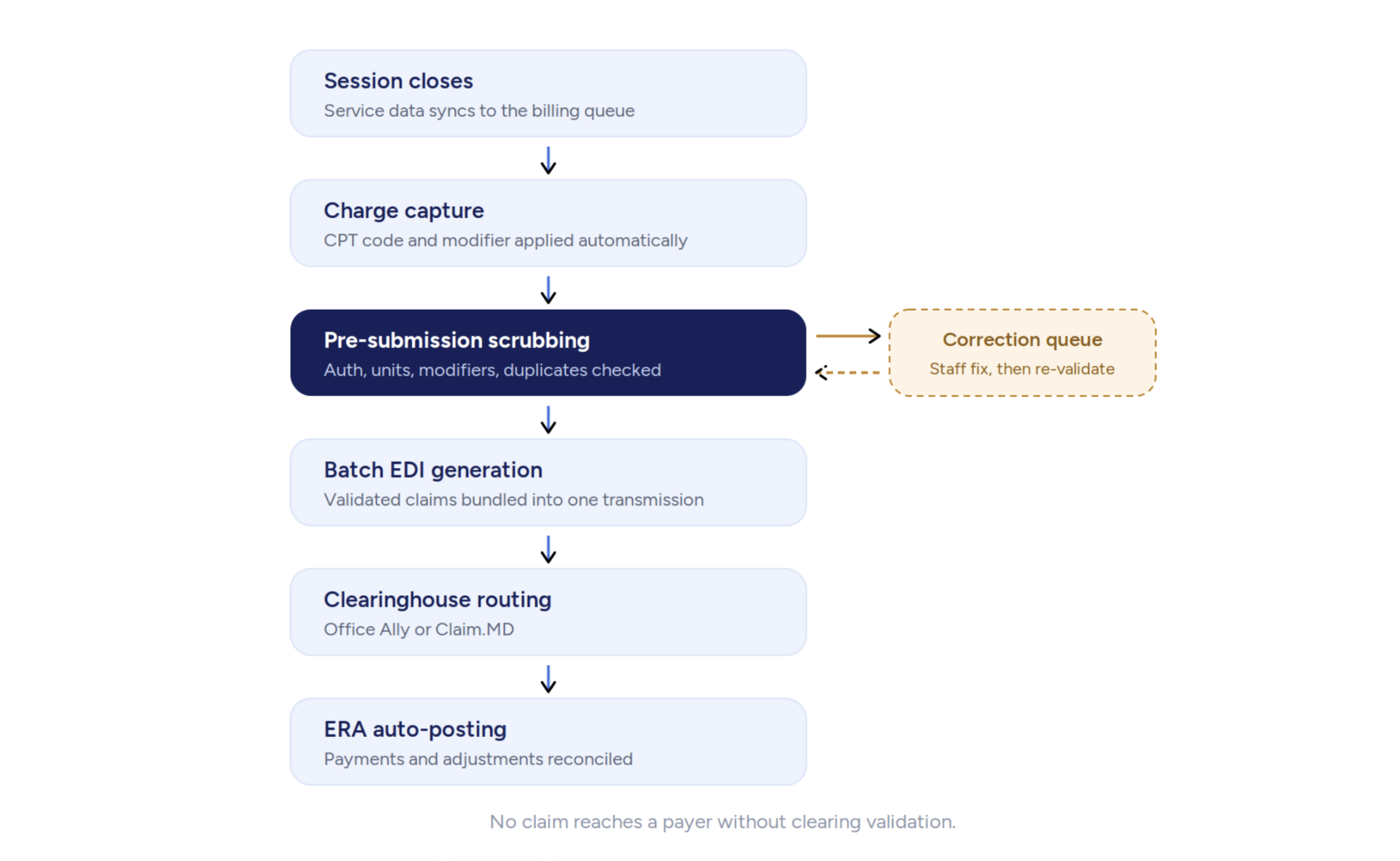
Step-by-Step Claims Submission Process
- Session closes and data syncs to billing queue.
- Claim scrubbing runs automatically.
- Staff review and resolve any flagged items.
- Batch EDI generation packages the clean claims.
- Claims route to the clearinghouse (Office Ally or Claim.MD).
- Status updates appear in the Claims tab as the payer processes.
Reducing Rejection Rates With Pre-Claim Validation
Direct clearinghouse connection means claims reach payers faster and with fewer routing errors than manual portal uploads. The first-pass acceptance benchmark is 95% or higher; pre-claim validation is the main lever for reaching that key performance indicator.
Monitoring Submissions and Resolving Errors From the Claims Tab
The Claims tab gives a full-pipeline view, and the claims submission and status tracking guide covers how to read each status flag and act on rejections without leaving the platform. Rejected claims surface with the clearinghouse rejection reason attached. Staff can correct and resubmit from the same screen. No leaving the platform, no switching tools.
Managing Denied Claims and Payment Posting
Post-submission, Theralytics auto-processes electronic remittance advice (ERAs) from supported clearinghouses, posting payments and adjustments to the correct claim lines without manual intervention. For payers without ERA enrollment, EOBs can be posted manually.
Denial rates across the industry are climbing. Experian Health's 2025 State of Claims report found that 41% of providers face denial rates at or above 10%, and OS Healthcare data puts initial claim denials at 11.8% in 2024, up from 10.2% the prior year. When systematic pre-submission and denial workflows are in place, that number moves. A case study on reducing ABA billing denials documented a 78% reduction in denials over 90 days after those workflows were implemented.
ERA/EOB Auto-Processing and Payment Reconciliation
ERA files sync automatically from Office Ally and Claim.MD, and ERA auto-processing and payment reconciliation steps through how to resolve sync errors when a remittance file doesn't post as expected. Payment lines post against the original claim, adjustments get recorded, and patient responsibility is calculated, none of it requires staff to touch each line individually. Secondary claims transmit electronically once primary adjudication data is captured, which cuts out manual EOB attachment for supported payers.
Denial Management and Claim Resubmission Workflow
Denied claims route to the denial queue with the reason code attached. The Advanced ABA Billing Service includes active follow-up on denied claims and aging A/R management; staff assigned to your account work denials directly rather than leaving them to age in a queue. Resubmission uses correction claim logic built into the platform.
Financial Reporting and Revenue Analytics
Theralytics' reporting and analytics dashboard gives real-time visibility into claim status, payment timelines, A/R aging buckets, and net collection rates. The behavioral health software market is expanding quickly, and industry analysis confirms ABA-specific analytics is a major driver of platform adoption. Practices selecting tools based on behavioral health software growth data increasingly prioritize integrated reporting. Market intelligence consistently places reporting depth among the top purchase criteria.
Tracking Claim Status and Payment Timelines
The dashboard shows every claim's position in the pipeline, submitted through paid. You'll notice payment timelines by payer become readable over time, which helps predict cash flow and exposes payers running longer than their contracted processing windows. Per ABA revenue cycle benchmarks, high performers keep A/R days under 30; anything over 50 days signals a structural cash flow problem.
Using Data to Manage Your Revenue Cycle
A/R aging reports break outstanding claims into 30-, 60-, and 90-plus-day buckets. Claims sitting in the 90-plus-day cohort have sharply lower recovery odds, flagging them early lets billing staff prioritize before that window closes. Net collection rate targets should sit at 90% or above; anything lower points to denial management gaps worth improving..
Compliance, HIPAA, and Regulatory Alignment in Theralytics
Theralytics holds SOC 2 Type II certification, mandatory MFA, and ONC Health IT Drummond certification. Payer audit exposure has grown as insurers deploy AI-driven pattern detection, Theralytics was designed with strong, automated guardrails and top-tier security specifically to keep billing processes compliant, efficient, and audit-ready in this increasingly scrutinized environment. Practices without integrated documentation and billing trails are most at risk.
HIPAA and CMS Compliance Safeguards
Every billing workflow in Theralytics runs inside a HIPAA-compliant data environment with full audit trails. CMS credentialing and modifier rules are baked into the platform's validation logic, not left to manual checks. Cybersecurity for ABA practices starts at the platform level, and secure practice management from day one prevents the compliance gaps that generate both denials and regulatory exposure.
Adapting to State-Specific Billing Rules
Payer-level configuration lets you set state Medicaid rules, EPSDT referral tracking, and Tricare-specific submission requirements per payer, not as global settings that create conflicts across plans. When state rules change, you update payer configuration inside Theralytics rather than rebuilding your workflow from scratch.
Theralytics vs. Other ABA Billing Solutions
The behavioral health software market is projected to grow from $7.48 billion in 2025 to $22.15 billion by 2032 at a 16.78% CAGR, per Credence Research. Market analysis places compliance tooling and clearinghouse connections as the main differentiators. Additional research from behavioral health software tracking, Grand View Research projections, and SkyQuest forecasts all confirm ABA-specific platforms outperform general billing tools on first-pass acceptance rates because of code-specific validation logic.
Reviewing the best ABA billing software options makes one thing clear: Theralytics stands apart by putting clinical data collection and billing inside the same platform, a gap that choosing the right ABA software requires practitioners to evaluate carefully. Documented case studies show one agency reaching a 98% collection rate using Theralytics' RCM workflow.
Main Advantages of Theralytics Billing Features
- Real-time session-to-billing queue sync with no manual re-entry
- Payer-level modifier and NPI configuration across commercial, Medicaid, Tricare, and MCO plans
- Direct ERA sync from Office Ally and Claim.MD; electronic secondary claim submission
- SOC 2 Type II and ONC-certified, HIPAA-compliant infrastructure
- Performance-based billing service at 4.5% of collected receivables
When to Choose Managed Billing vs. DIY Billing
DIY billing works when you've got a trained billing specialist and clean payer configuration already in place. Managed billing makes more sense when your denial rate is above 10%, your A/R days are climbing past 40, or your billing staff are stretched thin across other operational roles. The managed service includes active denial follow-up and aging A/R recovery. The DIY path doesn't, and that gap matters more than most practices realize until it's too late.
Getting Your Team Up to Speed
Theralytics' setup team walks new users through billing configuration step by step, covering clearinghouse enrollment, payer configuration, and claims workflow walkthroughs. Billing doesn't need to be intimidating. And with an interface designed for the way ABA practices actually operate, the learning curve is far shorter than what you'd face with general healthcare billing platforms.
Training Staff on Billing Practices
New billing staff should start with payer configuration review, then work through the claim lifecycle end-to-end using test claims before going live. Theralytics offers support guides and live chat, not just documentation. The goal is that your staff can troubleshoot independently within the first billing cycle.
Troubleshooting Common Billing Issues
Most issues fall into four categories: missing auth records, incorrect modifier pairings, clearinghouse enrollment gaps, and duplicate claim flags. Each has a specific fix path inside Theralytics. The day-club function resolves most duplicate issues. Auth errors resolve at the client profile level. Modifier mismatches correct in payer configuration. So it's one fix per problem type, not a claim-by-claim slog.
Conclusion
Mastering ABA billing and insurance claims isn't about working harder. It's about removing the manual steps that generate errors in the first place. Theralytics ties session scheduling, charge capture, pre-submission scrubbing, clearinghouse routing, ERA processing, and revenue analytics into a single workflow. Clean claims go out faster. Denials come back fewer. Your billing team spends time on recoveries and reporting instead of re-entry and guesswork. If you're ready to see what that looks like for your practice, schedule a demo and run through the workflow with the Theralytics team.