


Wrong ABA practice management software? That costs way more than the subscription. Hours disappear. Your clients lose consistency. Revenue slides. With the ABA software market growing at a fast pace, you've got more vendors than ever to pick from, which makes knowing how to choose ABA practice management software one of those skills that actually moves the needle.
Assess Your Practice Size and Scale
Map your operational reality first. Before touching any platform, nail down your clinical, scheduling, and billing needs. This prevents the common trap: buying enterprise software when you're running a small team, or undersized software that'll bottleneck you in two years. What's your staffing model? How many active clients do you carry? Which payers dominate your revenue? Those three things narrow options faster than any feature checklist ever will.
Solo and Small Practices (1-10 Clinicians)
Simplicity beats flexibility when you're small. You need scheduling, notes, and billing, full stop. Don't pay for multi-location features you won't touch for years. Look for transparent per-client pricing; see if there's a free tier while you're building your caseload. With a simple system, solo practitioners can manage their whole workflow from one dashboard. Clarity and time savings are what matter most.
Mid-Size Practices (11-50 Clinicians)
Mid-size teams hit different walls. Role-based permissions become essential. You need RBT supervision tracking. Authorization management across a larger client roster starts to demand real attention. Scheduling gets harder when multiple clinicians work different payer contracts. This is where reporting dashboards shift from nice-to-have to necessary. You need visibility into billable utilization and denial rates, not just whether appointments landed on the calendar.
Large and Multi-Location Practices
Large practices and multi-location operations need features that grow with you: multi-site scheduling, custom credentialing workflows, enterprise-level reporting. The platform must handle payer-specific billing rules across states without requiring manual fixes. Scalability isn't a bonus feature here; it's a selection criterion you'll regret overlooking. Ask vendors directly how their system performs at 500+ active clients before you sign any contracts.
Identify Your Must-Have Features
Map feature selection straight to your clinical delivery and administrative workflows. Picking the wrong features means paying for software that doesn't actually ease your burden. Start with two areas: how your clinical team documents and collects data, and how your admin team schedules, bills, and tracks authorizations. That's where to choose ABA practice management software that actually works for your practice. When testing features, it is useful to have multiple clinicians give their input or even better trial the software themselves.
Scheduling and Calendar Management
Authorization-linked scheduling isn't optional. It checks a client's approved units against scheduled sessions before the appointment is booked, stopping overbooking outside authorized hours. That prevents a specific problem chain: session happens, claim submits, payer denies because authorization was exceeded, staff spends hours on appeals. Scheduling software without authorization ties creates that risk constantly. You can track authorization details and view scheduled vs. remaining units to prevent it.
Clinical Documentation and Session Notes
Offline mobile data collection works where ABA actually happens: homes, schools, community settings where Wi-Fi disappears. If your platform only runs online, dropped connectivity mid-session creates a documentation gap. Field therapists need to finish notes, collect data, capture signatures offline, then auto-sync once they're back online. The mobile app's offline session capability handles exactly that. No internet access shouldn't mean no session record.
Billing, Claims, and Insurance Connections
Insurance claim scrubbing catches errors before submission. Good scrubbing logic stops coding mismatches (wrong CPT code for that clinician), missing authorizations, and modifier errors. Those three issues cause most ABA denials. According to the Experian Health State of Claims Report 2025, 41% of revenue cycle leaders report at least 1 in 10 claims denied. Pre-submission scrubbing fixes that directly. Cleaner claims mean faster reimbursement. Your ABA billing workflow should include electronic and non-EDI submission paths with denial alerting built in.
Data Collection, Analysis, and Progress Tracking
Automated graphing and reporting turns session data into treatment decisions without manual chart work. Progress appears across skill domains. Regression gets flagged. Visuals are ready to share with families and supervising BCBAs in minutes. Without this, a BCBA is manually building graphs from spreadsheets, a time drain that contributes to BCBA burnout already running high across the field. The reporting and analytics suite should surface authorization details, rendered sessions, and financial summaries without custom exports.
Payroll and Time Tracking
Payroll and time tracking matter most when you're managing BCBAs, RBTs, and part-time staff across different pay structures. Platforms that tie session rendering directly to payroll reduce double-entry and eliminate discrepancies between what was billed and what got paid out.
Client and Caregiver Portals
Caregiver portals let families track their child's progress, see session notes, and talk to the clinical team. Phone tag drops. Transparency increases. Families stay engaged in treatment. For practices moving toward outcome-based contracts, documented family engagement through a portal strengthens your position.
Evaluate Security, Compliance, and Data Protection
Every ABA platform touches Protected Health Information. HIPAA compliance isn't optional. But "HIPAA compliant" is just self-attestation. Look for the specific controls that make compliance real.
HIPAA Compliance and Encryption Standards
Your vendor must sign a Business Associate Agreement (BAA) before any PHI gets shared. Beyond the BAA, ask for AES-256 encryption for data at rest and TLS 1.3 for data in transit. Role-based access controls should limit what each staffer sees based on role. Your RBT doesn't need billing data; your billing specialist doesn't need clinical notes. Audit logging tracks every access event so you can demonstrate compliance if audited. These aren't theoretical. They're the difference between a defensible HIPAA posture and a breach that can be very costly to the company.
State and Federal Regulatory Requirements
Beyond HIPAA, some states add their own PHI protections and Electronic Visit Verification (EVV) requirements for Medicaid-funded ABA. If you bill Medicaid in any state, your platform's mobile application must support GPS-verified clock-in and clock-out. Not all platforms are EVV-ready. Confirm that the software has this feature before signing a contract.
Data Backup, Recovery, and Business Continuity
Ask vendors about backup frequency, recovery time objectives, and what happens to your data when you leave. Post-termination data access policies vary; some charge for exports or require paid professional services for migrations. Know those terms before you're locked in.
Consider Ease of Use and Staff Training
Setup effort varies wildly across platforms, and this gets underweighted in evaluation. A system with every feature you need is useless if your RBTs take three months to adopt it. Match software to your existing clinical and administrative workflows, not the other way around.
Clinician Workflow and Ease of Use
Your front-line staff, the RBTs entering data and completing sessions daily, need a clean, fast interface. Complicated navigation causes documentation errors and incomplete notes. Test with actual RBTs during your trial period, not just admin staff. A streamlined process means clinicians can access the system quickly and spend more time on clinical work.
Training and Ongoing Support
Ask about live training support, training materials, and support ticket response times. Some vendors assign dedicated specialists; others give you a knowledge base and a chatbot. The support documentation your vendor maintains tells you how seriously they take post-sale success.
Data Migration and Exit Strategy
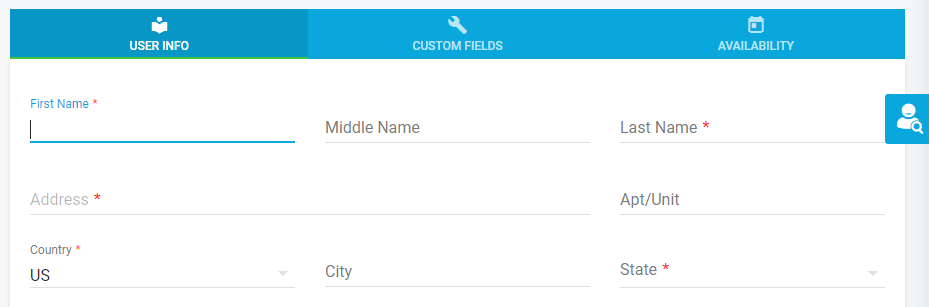
Data migration is where vendor relationships get messy. Confirm you can export your full data set in a portable format. Confirm there's no fee for it. If you're switching from another platform, that's your first negotiation point. Creating user profiles and migrating client records are structured processes when the platform is designed with migration in mind.
Assess Connection Capabilities and Telehealth Support
ABA platforms don't always sit alone. You might need connections to accounting software, state Medicaid portals, or school district systems.
Third-Party Software Connections
Ask about Application Programming Interface (API) availability, native connections, and middleware connectors. Here's the thing: a deep two-way connection pushes and pulls data in real time; a surface-level data export just dumps a CSV you upload elsewhere manually. The second creates reconciliation work, not a real connection. When a vendor says "we connect with QuickBooks" or "we link to your EHR," confirm which you're actually getting.
Telehealth and Virtual Session Features
Virtual ABA sessions need the platform to support virtual session documentation: capturing the client's telehealth address for scheduling, compliant session note completion, and in some states, virtual EVV. If you're delivering any remote services, confirm your platform handles all three. According to a 2026 review of top ABA practice management software options, telehealth support is now a standard evaluation criterion, not an add-on.
Compare Pricing Models and Total Cost of Ownership
Pricing structures across ABA platforms vary enough to shift your monthly cost by hundreds of dollars at the same caseload size.
Subscription Tiers and Per-User Costs
Most platforms use one of two models: per-client or per-user pricing. Per-client pricing scales with your caseload; per-user pricing scales with your headcount. A practice with 40 clients and 12 staff pays very differently under each model. Run the math at your current size and at projected 12-month growth. Theralytics offers a free startup package (free for 6 months or until your first client), so new practices can get operational without upfront commitment.
Setup Fees, Initial Implementation, and Hidden Costs
Setup fees, clearinghouse enrollment fees, and training costs add up. Some platforms charge for data exports, report customization, or extra user seats beyond a base tier. The pricing page should spell out what's included and what costs extra. If it doesn't, ask before signing.
Return on Investment and Long-Term Value
Integrated billing and revenue cycle management features improve collections by 15-25% compared to standalone billing tools, according to a 2025 Sprypt analysis. One practice using Theralytics moved from a 78% to a 98% collection rate after standardizing its billing workflows. That difference compounds. Run those numbers against your current denial rate and you'll build a real value case.
Test, Compare, and Request Demos
Platform demos and free trials show where marketing meets reality. Use them aggressively.
Free Trials and Sandbox Environments
Request a sandbox environment where your team can run through a full session workflow: create a client profile, schedule an appointment, collect data, render the session, generate a claim. If a vendor won't give you access to test real workflows, that's telling. According to a 2026 buyer's guide to ABA practice management software, hands-on trials are the single most reliable way to assess fit.
Feature Comparison and Scoring Checklist
Build a scoring checklist before your demos. Weight features by importance to your practice. A mid-size practice might give authorization-linked scheduling and RBT supervision tracking 10 points each, while caregiver portals score a 5. Scoring keeps you from choosing the platform with the best sales pitch instead of the best fit. Platforms worth including in your comparison: CentralReach, Passage Health, AlohaABA, and ABA Matrix alongside anything you're already familiar with.
Vendor References and Case Studies
Ask each vendor for two or three references from practices similar to yours in size and payer mix. Check third-party review platforms; read published case studies. A case study that shows a specific before-and-after metric (collection rate, denial rate, documentation time) beats a generic testimonial. If a vendor can't produce references, that's a gap worth exploring.
How Theralytics Addresses the ABA Software Selection Problem
Most ABA practices struggle to choose ABA practice management software because they evaluate features separately instead of as a connected workflow. Theralytics was built around exactly that problem. Clinical data, scheduling, billing, and documentation all live in one system with no manual handoffs between them.
On security, Theralytics completed a SOC 2 Type II audit with no exceptions (conducted by A-LIGN) and holds ONC Health IT certification. Mandatory MFA and AES-256 encryption are built in by default, not optional add-ons. Your security and compliance posture meets HIPAA technical safeguard requirements without additional configuration.
Pricing is straightforward. The combined practice management and data collection package runs $30-$40 per client per month (per-client model), with a free startup package for new companies. No hidden setup fees, and the ABA documentation management features include automated credential expiration alerts, which helps BCBAs maintain certification. There is an operational risk with the current shortage of credentialed BCBAs so tracking becomes critically important. The ABA scheduling software ties directly to authorization tracking, stopping overbooking before it becomes a claim denial.
Conclusion
Getting the right ABA practice management software comes down to matching platform capabilities to your size, payer mix, and clinical workflows, before feature lists distract you. Prioritize authorization-linked scheduling, claim scrubbing, offline mobile documentation, and SOC 2-verified security. Test with real staff. Check references. Calculate total cost at your projected caseload, not just today's numbers. The practices that get this decision right spend less time on admin and more time on the work that actually matters.