


Running an ABA practice without purpose-built software is like treating a client without a behavior plan: you might get by, but you're leaving outcomes on the table.
Once you see how much revenue and time disappear into manual workflows each week, the question isn't whether you need software, it's why you haven't switched already. Claims get denied. Session notes fall behind. Schedules conflict. BCBAs end up buried in paperwork instead of sitting with clients. None of that should hold up your payroll or your claim submissions, but managing A/R and chasing down overdue session notes often does exactly that.
Theralytics is built to take that weight off your shoulders from day one. Onboarding is designed to get you running fast, and once you're in, comprehensive reports and real-time KPIs make auditing seamless, giving you full visibility instead of a monthly scramble.
The Administrative Burden Killing Your ABA Practice Productivity
In ABA, every session must be documented to support a billable claim, a compliance audit, and a treatment plan at the same time. Without integrated tools, this burden compounds fast. The real purpose of practice management software is replacing the patchwork of spreadsheets, manual billing, and disconnected apps that drain time and create errors across your entire practice.
How Manual Processes Drain Time and Money
When a therapist manually logs a session, a biller re-enters that data into a separate system, and a BCBA reviews paper notes for compliance, you've just turned one clinical event into three separate administrative tasks. According to a 2025 workforce analysis, operational delays cost ABA teams up to 10 hours per staff member per week. Multiply that across your team, the math gets uncomfortable fast.
Those hours aren't free. They're paid clinical hours spent on admin instead of direct care. And here's the catch: when session notes get typed up hours after a session ends, accuracy suffers.
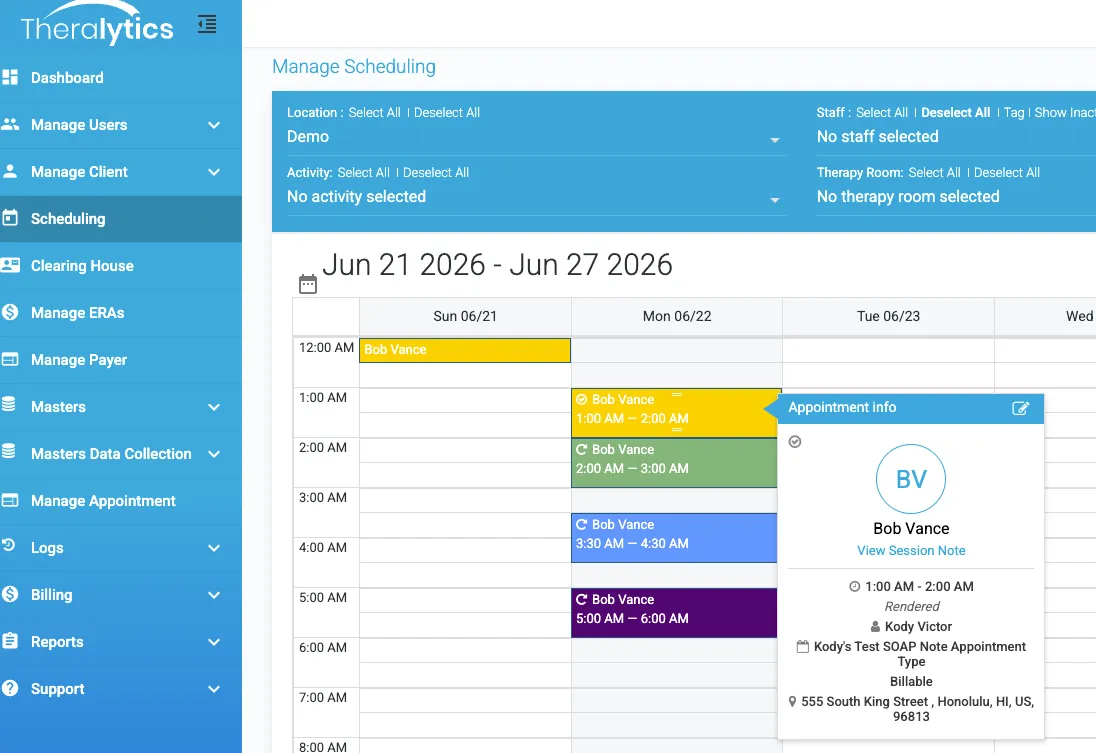
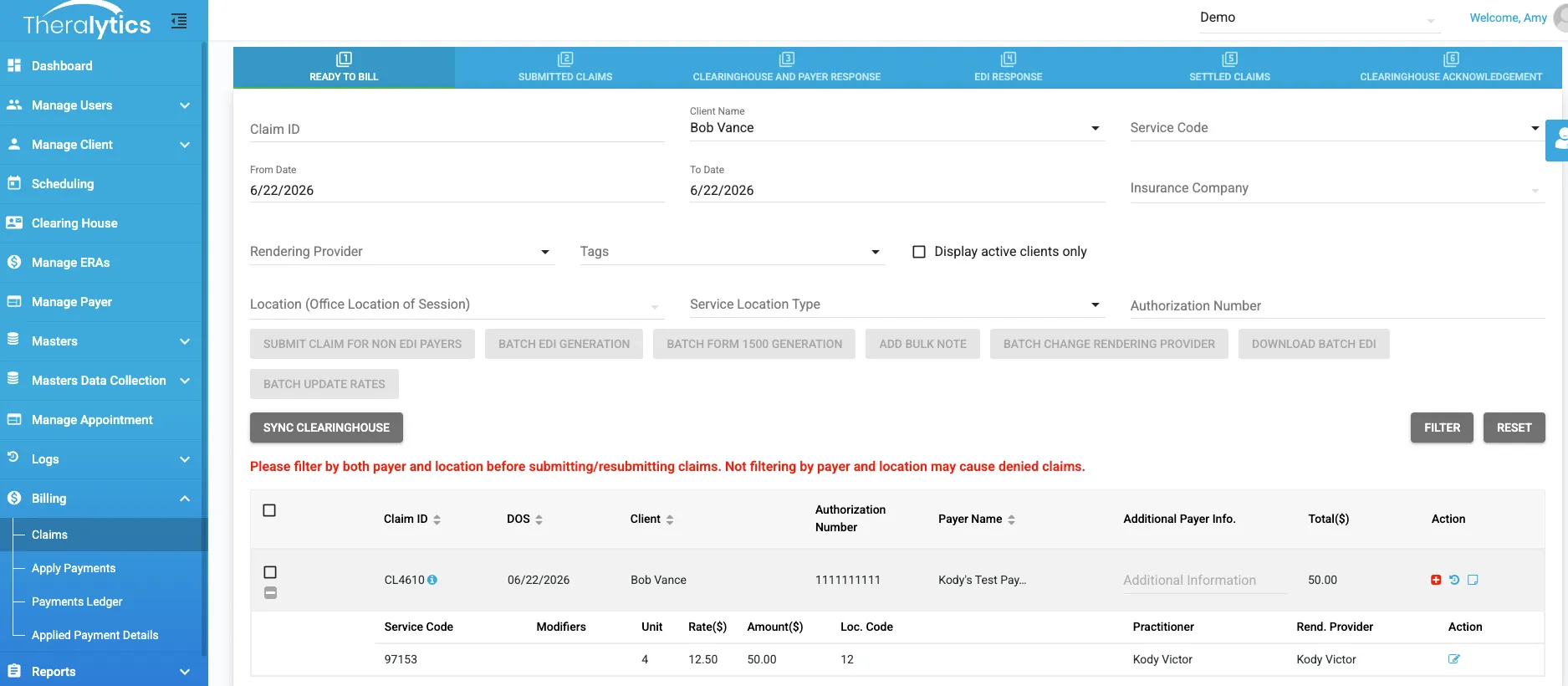
Theralytics eliminates this friction entirely. The moment a provider completes a session note, the claim is automatically generated and ready for billing. Our onboarding handles the heavy lifting, pre-loading all client and payer data so your system is fully optimized from day one.
The following is a completed session note with a checkmark on the calendar with the claim already generated and sitting ready to bill:
The Hidden Cost of Disconnected Systems
Separate tools for scheduling, billing, and ABA data collection don't just create duplicate work. They create gaps where things fall through. A scheduling system that doesn't talk to your billing platform? Authorizations get exceeded. A documentation tool disconnected from your claims workflow? CPT codes get mismatched. Those mismatches are exactly what HHS-OIG auditors find when they review Medicaid claims.
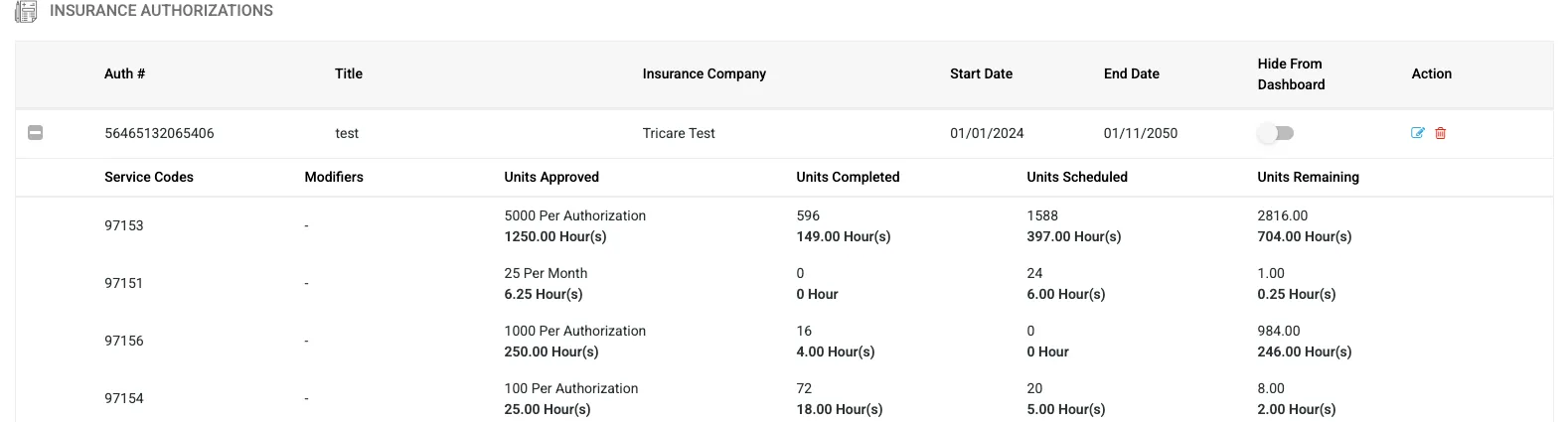
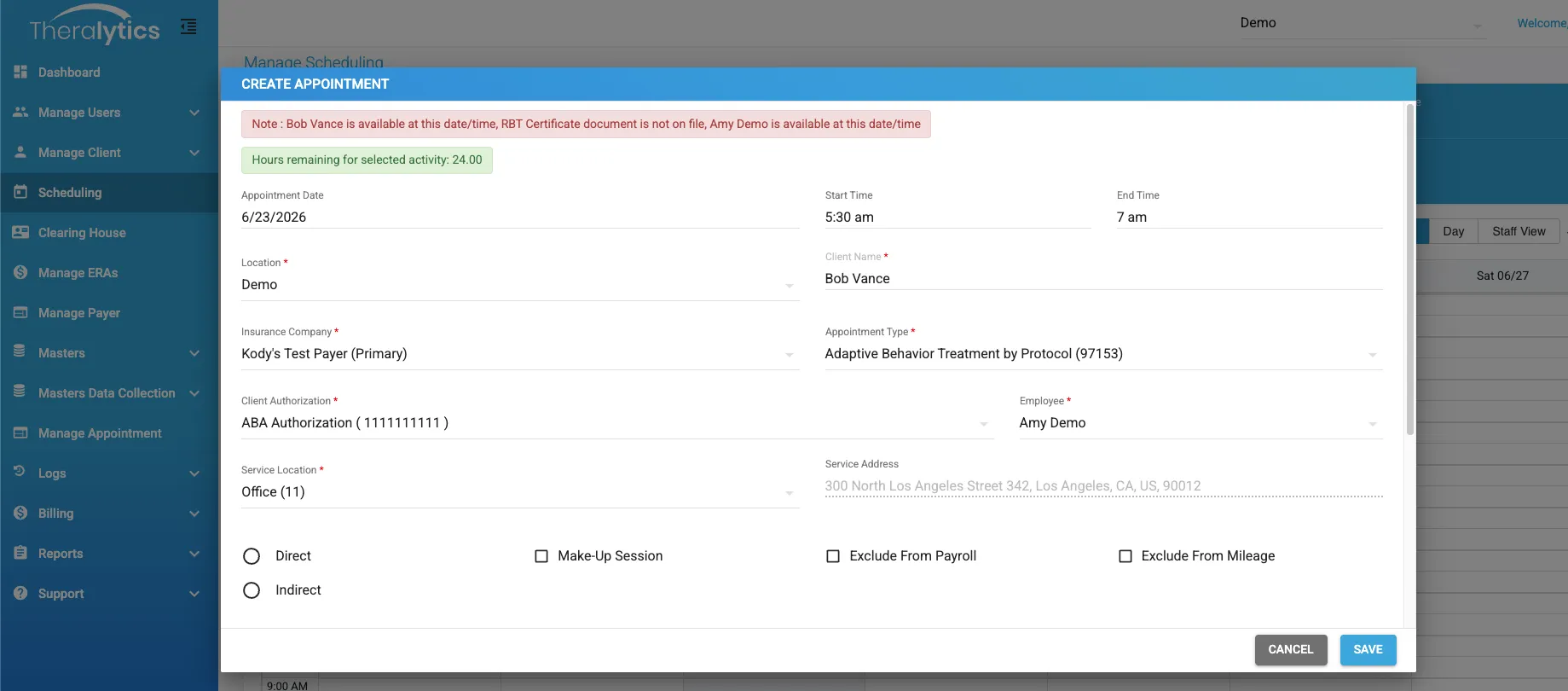
Theralytics allows you to track authorization utilization in real time. To prevent over-scheduling, the system enforces strict guardrails: if you attempt to schedule more hours than what remains on an authorization, an error message will block the action. Conversely, if hours are available, the system will display the exact remaining balance for your use.
And the workforce operational strain from juggling disconnected tools is a direct contributor to BCBA burnout, which ran above 70% by self-report in recent surveys. It correlates directly with practices that haven't automated their administrative workflows. The connection isn't subtle.
Problems Practice Management Software Solves
ABA practice management software isn't just convenient. It exists to fix real revenue and compliance problems that cost practices money every month. Each bottleneck below connects directly to either lost revenue or audit exposure.
Scheduling Chaos and Missed Appointments
Intelligent scheduling in practice management software prevents double-booking, therapist misalignment, and no-shows by consolidating everything into a single calendar enforcing availability rules. But the bigger compliance feature is authorization tracking. The system checks whether a scheduled session falls within an approved payer authorization before the appointment is ever booked. Over-utilization denials stop before they start.
Credential management matters too. The software tracks staff certifications, BCBA supervision ratios, and expiration dates. You'll never accidentally schedule an RBT for a session requiring a higher credential level. That's a billing error and compliance risk in one.
Billing Errors and Delayed Insurance Claims
ABA billing software runs the full claims cycle: claim generation from rendered sessions, payer-specific CPT code mapping, remittance posting, and denial alerts. When a claim is about to go out with a mismatched code or missing modifier, the system flags it before submission. Not after a denial arrives.
According to Experian Health's 2025 State of Claims survey, 41% of healthcare providers report that more than 10% of their claims get denied. For ABA practices billing Medicaid and commercial insurers with time-based codes like 97153 and 97155, that rate runs even higher without automated scrubbing. Faster, cleaner claims mean faster revenue cycles.
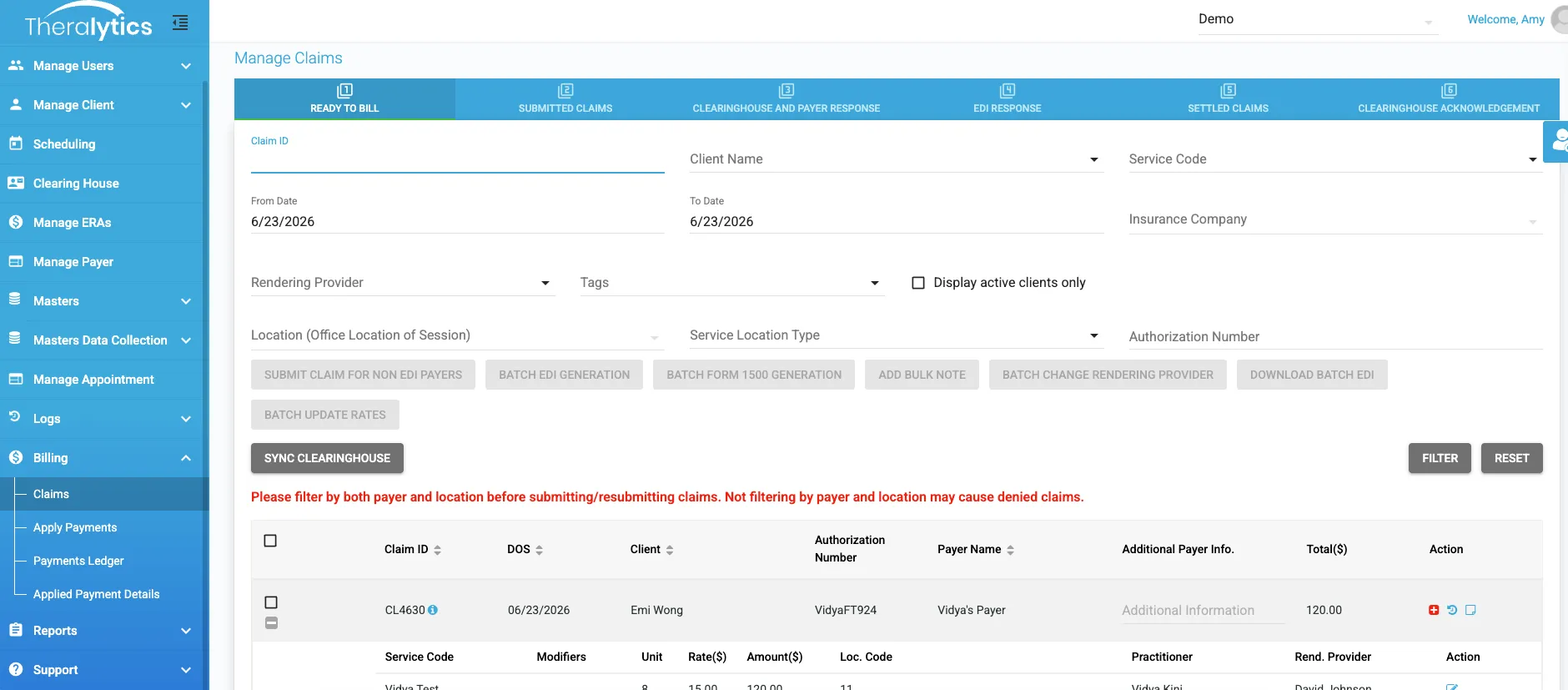
Managing your revenue cycle doesn't have to be a full-time headache. Theralytics gives you a clear, step-by-step view of your claims cycle. Because we integrate directly with clearinghouses, the entire process is streamlined. This gained time can be spent far less on tracking claims or building A/R reports and more time focused on your practice:
Documentation Bottlenecks and Compliance Gaps
Practice management combined with electronic documentation means session notes, treatment plans, and progress summaries all live in one system. No more Google Docs scattered everywhere. No more email threads buried in inboxes. Digital signature collection creates a compliant documentation chain: therapist signs the note, BCBA countersigns supervision, parent or guardian signs where required.
HIPAA compliance isn't just about where data sits. It's about who touched what and when. Automated documentation workflows create audit trails showing exactly which staff member completed which note at what time, precisely what payers and OIG auditors look for when reviewing claims. The hidden challenges of running an ABA practice become especially visible in documentation. Billing codes, proper records, and A/R management are rarely taught in BACB programs, yet mishandling them can end a practice.
Theralytics makes the entire audit process easier by making comprehensive documentation accessible in just a few clicks. Session Notes Export lets you pull together a client's, staff member's, or date range's full note history instantly, and you can choose whether to include clinical data or leave it out. Session Audit Reports verify provider clock-in times and GPS locations, while Billing Audit Reports flag any changes made to appointment times or unit allocations. Put together, you get a level of transparency that makes audits something you walk into prepared, not something you scramble to survive.
Staff Coordination and Payroll Headaches
Good ABA practice management software tracks session hours, travel time between appointments, and billable versus non-billable activity at the individual staff level. That data feeds directly into payroll processing, eliminating the manual reconciliation step where someone compares a calendar against a timesheet.
For clinics running both RBT and BCBA supervision hours, the distinction matters for revenue reporting and supervision compliance. The software logs it automatically. No spreadsheet needed.
How Integrated Software Transforms Your Practice Operations
ABA practice management changes completely when clinical and administrative systems are unified. BCBAs don't interrupt sessions to ask about scheduling conflicts or chase down missing notes. The platform handles coordination in the background so clinical work stays clinical.
Centralized client records and treatment tracking
Every client's authorization details, treatment goals, session history, and progress data sits in one profile. BCBAs pull up a client's entire clinical picture before a supervision session without opening three different apps. Real-time progress tracking and reporting lets supervisors spot plateau patterns or emerging behaviors before the next treatment plan update comes due.
Real-time scheduling and resource management
When scheduling connects directly to billing and documentation, a rendered session immediately moves into the ready-to-bill queue. Nothing falls through the cracks between calendar and claims workflow. Staff availability, credential levels, and authorization limits all update in real time.
Automated billing and faster revenue collection
Billing automation doesn't just reduce errors; it speeds up the entire cash cycle. Claims go out faster. Remittances post automatically. Your accounts receivable reporting gives you a live picture of what's owed and what's overdue. One ABA agency moved to structured revenue cycle management and improved its collection rate from 78% to 98% by standardizing billing workflows and tightening follow-up processes.
Built-in compliance and data security
Patient data in an ABA practice is Protected Health Information (PHI). The software must provide AES-256 encryption, role-based access controls, and audit logs recording every data access event. Role-based access means an RBT sees their assigned clients and nothing else; a BCBA sees their supervision caseload; billing staff see claims data without touching raw clinical notes.
Digital signature collection creates the compliant documentation chain HIPAA requires. Combined with multi-factor authentication and SOC 2 Type II certification, a well-built platform holds up under payer audits and HHS-OIG scrutiny. The security architecture behind ABA practice management isn't optional for practices billing Medicaid; it's a compliance requirement built into every workflow.
Quantifiable Returns: What Better Software Actually Delivers
The financial case for ABA practice management software comes down to three numbers: time saved, claims collected, staff retained. Each one carries a dollar value.
Reducing administrative overhead and staff burnout
AI-assisted session note tools have cut BCBA documentation review time from 10 hours per week to approximately 3 hours per week according to a 2026 industry report from vgsoft.co. That's 7 hours per BCBA per week returned to billable supervision or direct client care. Even at a modest hourly rate, that's hundreds of dollars per clinician weekly.
BCBA burnout is tied directly to administrative overload. Replacing a burned-out BCBA costs far more than a software subscription. Staff turnover in ABA averaged 77.4% to 103.3% annually in 2024 per CentralReach's 2025 report. Reducing admin burden is one of the most direct levers practices have on retention.
Improving billing accuracy and claim approval rates
Initial claim denials hit 11.8% in 2024, up from 10.2% just a few years earlier per OS Healthcare data. Reworking a denied claim costs between $25 and $181 per occurrence. A practice submitting 500 claims monthly with a 10% denial rate pays to rework 50 claims each month. Drop that denial rate to 4% with automated scrubbing and you recover 30 rework cycles per month, roughly $750 to $5,400 monthly depending on claim complexity.
Over 6 to 12 months, cleaner billing compounds; faster payment cycles reduce the cash gap between service delivery and revenue receipt.
Scaling your practice without scaling your back office
The most direct financial argument for software is breaking the linear relationship between client volume and administrative headcount. Without software, adding 20 clients means adding billing hours, scheduling hours, documentation review hours. With software, workflows that handle 50 clients handle 150 with incremental adjustments. That's not proportional staff increases. And that's how ABA therapy practice growth stays financially sustainable as you add locations or expand caseloads.
Required Features Your Practice Management Software Must Have
Not every platform marketed to ABA providers is built for ABA workflows. This checklist covers what actually matters when evaluating options. Pay attention to product development plans and customer testimonials from similar-sized ABA practices; active development and real-world case studies from clinics like yours are stronger signals than a feature list.
Intuitive interface and minimal learning curve
A platform that takes six months to adopt isn't helping; it's delaying. Look for software built by people who understand ABA workflows, not generic healthcare platforms with ABA bolt-ons. RBTs and BCBAs should complete their daily tasks within the first week of use.
Insurance connections and denial management
Your ABA billing software must connect to your clearinghouse, support payer-specific CPT code rules, and alert you to denial-prone submissions before claims leave the system. Automatic ERA syncing and manual EOB posting should both be available; not every payer supports electronic remittance. Authorization tracking must pull directly into claims to prevent over-utilization errors.
Therapy documentation and progress reporting
Session notes, behavior intervention plans, treatment plan updates, progress summaries, all should live inside the same system handling scheduling and billing. Automated graphing for data collection turns raw session data into visual progress charts that BCBAs can review quickly, without exporting to a spreadsheet first.
Theralytics has graphing and reporting capabilities that streamlines progress report writing and graphing.
Mobile access for clinicians in the field
Home-based and school-based ABA sessions happen outside the clinic. Your platform needs a mobile app that works offline, collects data without internet, and syncs when connectivity returns. Electronic Visit Verification (EVV) support is mandatory for Medicaid billing in most states; the mobile app should handle clock-in and clock-out with GPS coordinates built in.
Pricing, Scalability, and Vendor Evaluation
Software cost is one of the first questions practices ask. The answer depends on which pricing model the vendor uses; understanding the full cost structure before signing matters more than the headline per-client rate.
Understanding cost structures and pricing tiers
ABA practice management platforms typically use one of three pricing models:
| Model | Structure | Best For |
|---|---|---|
| Per-client/month | Flat rate per active client | Small to mid-size practices |
| Per-user/month | Rate per staff member using the system | Larger teams with fewer clients |
| Tiered SaaS | Bundle tiers by feature set or location count | Multi-location or enterprise practices |
Across the industry, pricing generally ranges from $20 to $40 per client/month for standalone modules, and $45 to $60 for bundled practice management and data collection. While some vendors offer free startup tiers for new clinics or solo BCBAs, it is critical to look at the hidden costs. This can include clearinghouse fees, setup charges, and billing services (which typically take 4% to 6% of collected revenue).
Many software providers hide their largest rates behind enterprise custom quotes. At Theralytics, we take a different approach: our flat-rate pricing remains transparent and predictable, giving you the exact same competitive rates no matter how large your practice grows
How should practices review product plans and customer testimonials?
Ask vendors directly: what shipped in the last six months, and what's planned for the next six? Active ABA-specific development signals a vendor that understands your workflow will keep evolving. Generic healthcare platforms often deprioritize ABA-specific requests.
Customer testimonials from similarly sized ABA clinics matter more than enterprise case studies if you're running a 10-therapist practice. Look for specifics; denial rate improvements, documentation time reductions, or collection rate gains tell you everything. Vague praise tells you nothing. Reviewing options across the best ABA practice management software gives you a structured comparison across features, pricing, and clinic fit.
Choosing the Right Platform for Your Practice Size
The right software for a solo BCBA launching their first practice is rarely the right software for a 200-therapist network. Matching platform capabilities to your actual operational needs saves money and adoption friction.
Solo practitioners and small clinics
Solo BCBAs and small clinics (under 25 clients) need straightforward scheduling, clean billing, and mobile data collection without a heavy setup burden. Platforms like Theralytics offer a free startup package for new practices, letting you build workflows before carrying a full client load. CentralReach and Motivity are also used at this tier, though their deeper customization often means a steeper setup curve smaller teams may not need initially.
At this stage, the goal is getting claims out accurately and session notes completed on time. Added capabilities come later.
Multi-location and enterprise ABA organizations
Larger ABA networks face a distinct operational challenge: centralized oversight across sites with different therapists, authorization sets, payer mixes. Practice management software at this scale must handle cross-site scheduling (with location-based filtering), consolidated billing across providers, and reporting dashboards aggregating performance across all locations without manual exports.
CentralReach sees heavy use at the enterprise tier for its depth of customization. Motivity expanded its platform in April 2025 to include full enterprise practice management alongside its clinical data tools. Theralytics supports multi-location practices with centralized scheduling permissions and consolidated reporting. The right fit depends on whether your priority is clinical customization, billing depth, or total workflow coverage.
Evaluating vendor support and setup quality
Good vendor support during setup means a dedicated contact, structured training for clinical and billing staff, and a clear timeline for going live. Ask: how long does a typical migration take, and what does the vendor's team do if data imports fail?
After go-live, look for live chat, phone support with reasonable response times, and a documented knowledge base your staff can self-serve from. Practices picking vendors based on price alone often discover poor support costs more than the price difference. If a vendor can't tell you their support response time before you sign, that's worth noticing.
Getting Your Team Onboard
A realistic setup timeline for a mid-size ABA practice runs four to eight weeks from contract to full go-live. That includes data migration, payer setup, staff training, and a parallel-run period where both old and new systems operate simultaneously to catch gaps. Practices with large legacy databases or years of client records should budget toward the longer end.
Before migration, audit your existing data quality. Incomplete client profiles, unmapped CPT codes, messy authorization records, they don't clean themselves during import. Sending dirty data into a new system just means dirty data in a nicer interface. Ask vendors about EHR or legacy system compatibility and whether they provide data mapping support as part of the migration.
Phased rollout vs. full platform migration
Practices with active legacy systems face real risk during full cutover: if something breaks, billing stops. A phased rollout manages that risk by running scheduling and documentation on the new platform first, then migrating billing once staff feel comfortable and data is verified. The trade-off is a longer parallel period and temporary duplication of work.
Full migration makes sense when your legacy system is truly broken or when data quality is clean enough to transfer confidently. Practices with large client record databases should treat data migration and compatibility as the top factor in this decision, not just feature preference.
Training staff for adoption and sustained use
Training isn't a one-time event. Plan for role-specific training: RBTs need session data collection and note completion on mobile; BCBAs need supervision reporting and treatment plan workflows; billing staff need claim submission and denial management. Most vendors provide recorded walkthroughs and live sessions; take all of them.
Set a 30-day check-in after go-live to surface workflow gaps before they become billing problems. Staff struggling silently with the new system are the ones falling back to spreadsheets and manual notes by week six.
Measuring success and optimizing workflows
Track three numbers in your first 90 days: claim denial rate, session note completion time, days in accounts receivable. Those metrics tell you whether the software is working. If denial rates don't drop within 60 days of setup, your payer and CPT code mapping needs adjustment. If note completion time stays flat, your documentation templates don't match how therapists actually work.
How Theralytics Addresses ABA Practice Management End to End
Theralytics was built by a BCBA and practice owner who lived through the administrative collapse of poor systems created. That origin matters because the platform reflects actual ABA workflows: scheduling that tracks authorizations in real time, billing that auto-populates claims from rendered sessions, documentation feeding directly into progress graphs without manual exports.
Where many generic health platforms require separate modules stitched together, Theralytics runs scheduling, ABA documentation management, billing, and data collection inside one unified system. The platform holds independent security certifications including SOC 2 Type II with zero audit exceptions and ONC Health IT certification. Role-based access, MFA, full audit trails, they're built into every workflow, not added after the fact.
On the billing side, Theralytics connects to Office Ally for electronic claim submission, supports automated ERA syncing, and flags denial-prone claims before submission. The ABA billing service option runs at 4.5% of collected revenue, with discounts on the software subscription for practices using it. For practices choosing software-only, per-client pricing starts at $20 per month with no setup fees and no hidden charges. The mobile app works offline with EVV-ready clock-in/out, covering Medicaid compliance requirements for field-based sessions.
Conclusion
Your ABA practice needs practice management software because manual workflows don't just slow you down; they actively cost you revenue, create compliance exposure, and burn out clinical staff you can't afford to lose. The data is consistent across the board: denial rates are climbing, audit scrutiny is intensifying, and administrative overhead is the single largest factor in BCBA turnover.
The right platform ties scheduling, billing, documentation, and clinical data together so that each piece of clinical work generates accurate records, clean claims, and defensible audit trails without requiring extra staff hours. That's why your ABA practice needs practice management software built for ABA, not adapted from a generic healthcare template.